
In a Nutshell
Short version: to check your eTA status you need your eTA application number (from your confirmation email), plus your passport number, the country that issued it, and the passport’s issue and expiry dates. For an eTA you already hold, use your eTA number (or UCI, if you have one) instead of the application number. With those details in hand, you can check your eTA status through a paid private service, separate from the Government of Canada.
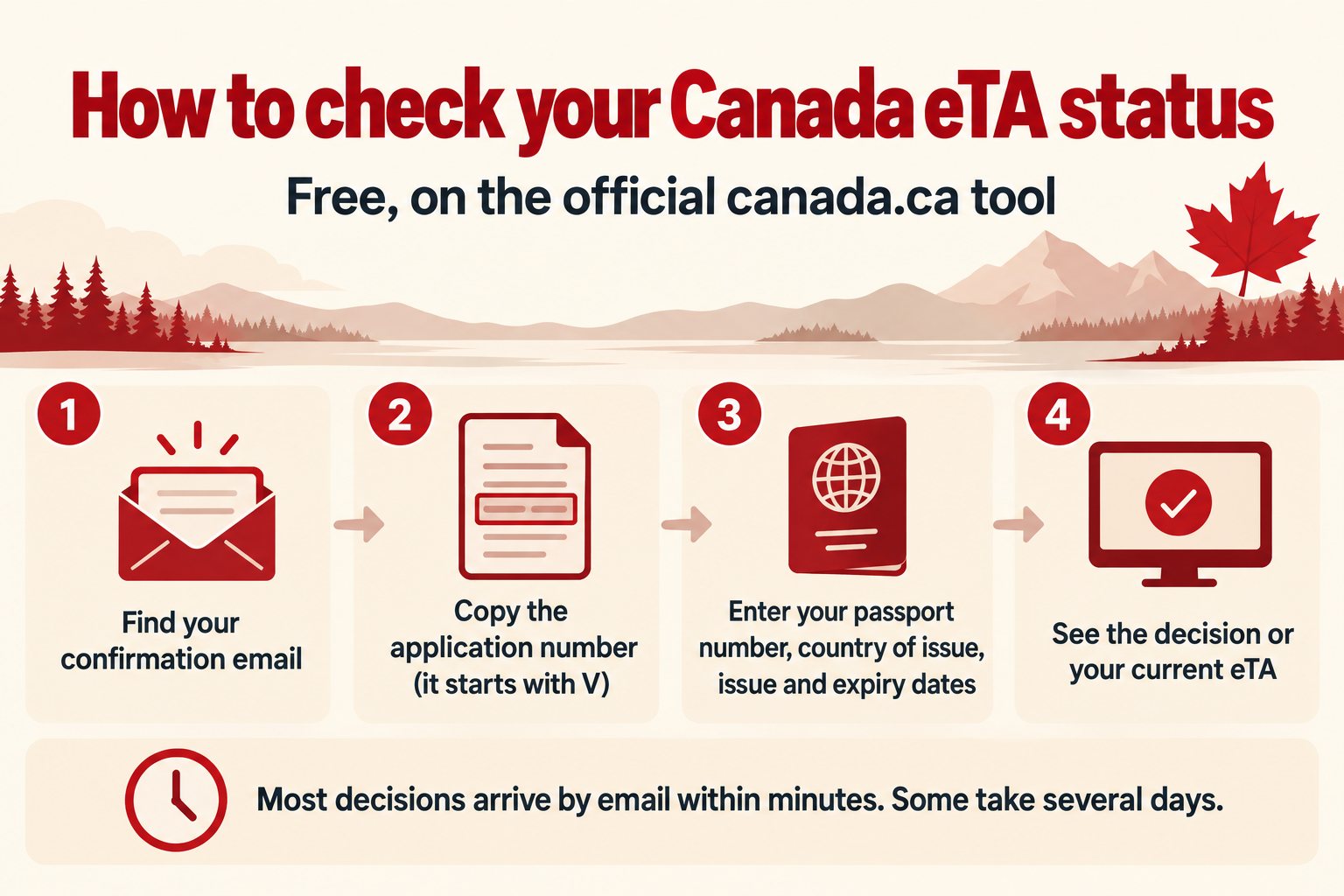
Checking on canada.ca is free, and the steps are walked through below. The government’s tool shows whether a decision has been made and, once you have an approval, the status of your current eTA. The confirmation email you received after submitting carries your application number and usually arrives first.
If you hold dual citizenship, the Canada eTA and dual citizenship page explains which passport you should use when applying. Applying for the first time? Start with the step-by-step first application guide.
You’ve hit submit. Now you’re waiting. Here’s exactly where to look and what to do the moment you find your status.
For most applicants, the wait is short: an email arrives within minutes of submitting in most cases. Some applications take several days to decide. Either way, a confirmation email with your application number should still arrive close to when you submit; if it hasn’t come through, check your junk or spam folder first, since automated messages from government systems get caught there often enough that it’s worth doing before you assume something is wrong. If nothing has arrived within 72 hours of applying, IRCC’s web form is the way to ask about it (details in the section on checking without an application number below). If your application is ultimately refused, the Canada eTA refused: what happens next page explains the options available to you. Applying with enough lead time before you book anything matters too: see when to apply for a Canada eTA for how far in advance is safe.
Whatever the email says when it arrives, it will tell you your next steps. That’s the document you act on first. But if you’d rather not wait for it, or if you submitted days ago and still haven’t heard, the official eTA status tool gives you the same information on demand.
How to check your eTA status online
- Go to canada.ca and open the Check your eTA status tool under Electronic travel authorization (eTA).
- Choose whether you’re checking a pending application or an eTA you already hold, then enter your application number (pending) or your eTA number, or UCI, if you have one (existing eTA).
- Enter your passport number, the country that issued it, and the passport’s issue and expiry dates, exactly as they appear on the application.
- Submit the form and read the result: it will show whether a decision has been made, or the status and expiry of an eTA you already hold.
- If the tool doesn’t recognize your details, double-check for typos before trying again; a single mismatched digit in the passport number or a wrong date is the most common cause.
The eTA tool needs no account: you don’t register or sign in, you just fill in the form each time. Once you have a result, move straight to the verification step that actually protects your trip: the passport-number check below.
Can I check my eTA status without the application number?
Not with the official tool. It asks for the application number, which starts with a V and is printed at the top of the confirmation email, together with details from the passport you applied with. Without that number the tool has nothing to look up, so the first job is to find the email.
Search your inbox and your junk or spam folder for messages from IRCC, and look at the address you typed on the form, because a typo sends the email somewhere else. IRCC sends its emails to the address entered on the application form.
If no email has arrived within 72 hours of applying, use IRCC’s web form: select Electronic Travel Authorization as the type of application, then Case Specific Enquiries. From outside Canada you can also call 1-800-O-Canada, Monday to Friday, 8:00 a.m. to 8:00 p.m. Eastern Time, in English or French.
Where your status lives: email first, then the online tool
The email you receive after applying does more than confirm receipt. If your eTA is approved, it contains your eTA number. That number matters less for boarding (the approval is electronically linked to your passport, so there’s nothing to print or carry), but it’s useful for cross-referencing if anything looks off later. Save the email. If you don’t have an email address of your own to apply with in the first place, see applying for a Canada eTA without an email address for how that step works.
If you can’t find the email or it never arrived, the official status tool lets you check your eTA status on demand using the details from your original submission. For everything the confirmation email is supposed to contain and how to read it, see your eTA email: check the status line. If you’ve lost the confirmation details entirely and can’t get the tool to recognize your application at all, see what to do when a Canada eTA application can’t be retrieved.
What each status means and what you do next
| Status | What it means | What to do |
|---|---|---|
| Approved | The decision is made and the eTA is linked to your passport. | Compare the passport number in the email with your physical passport, digit by digit. Nothing to print or carry. |
| Still in process | The application is still being reviewed. This is not a refusal. | Wait for the email or check the tool again. Do not apply a second time while a decision is outstanding. |
| Asks for more information | Something more is needed from you before a decision. This is not a refusal. | Follow the instructions in IRCC’s email and answer exactly what is asked. Act quickly if your trip is close. |
| Refused | The application was reviewed and denied. | See what happens after an eTA refusal for the options. |
Approved. The decision is made, the eTA is active, and it’s already linked to your passport. You don’t need to print anything, carry anything, or notify the airline. The Approved line records a past decision, though, so see reading each status result for how to confirm the eTA is still valid today. What you do need to do is covered in the next section. Do it immediately.
Still in process. The application is still being reviewed. This is normal for applications that fall outside the automated approval window. You don’t need to contact IRCC; checking the tool or waiting for the email is the right move. How close you are to your travel date is what matters, and that’s covered below.
Asks for more information. This status means something more is needed from you before a decision can be made. It’s not a refusal. Read the section below on what to do.
Refused. The application was reviewed and denied. This is a different situation from a pending or incomplete application, and it has its own path forward. The Canada eTA refused: what happens next page covers your options in detail.
The passport-number check you must do immediately
This is the step that most people skip because they assume the system handled it. It didn’t: you entered the passport number manually, and manual entry creates errors.
Open your approval email and find the passport number it references. Then open your physical passport to the data page and read the number printed there. Compare them digit by digit, letter by letter. They must be identical.
The reason this matters so much: your eTA is electronically linked to the passport number on file, not to you as a person. When the airline checks your documents at the gate, they’re matching your passport to the eTA record. If those numbers don’t match, the system doesn’t see a valid eTA, and an incorrect passport number on the application may prevent you from travelling to Canada entirely. If the airline has already told you it can’t find your eTA, see what to do if the airline can’t find your eTA at check-in.
If you catch a mismatch now, you have time to reapply. If you catch it at the airport, you don’t. Getting a new eTA at the last minute may not be possible, which means a missed flight and a rebooking, at minimum. Catching a passport or name error before you ever submit is even better: see fixing mistakes on your Canada eTA before you submit for what to review first.
If you’ve recently been issued a new passport since your eTA was approved, that’s a related but separate situation: a new passport number means your existing eTA is no longer linked to the document you’ll be travelling on. The Canada eTA approved but new passport issued page explains exactly what to do in that case.
How to check if your eTA is still valid
Checking status and checking validity are two different questions. Status tells you whether a decision has been made on an application. Validity tells you whether an eTA you already hold still works for boarding, and that depends on your passport, not the five-year approval window most people remember. See your eTA may have expired before you think for how passport expiry can end an eTA years early, and what to check before you book.
If your application is still pending close to your travel date
Most applications are decided within minutes; some take several days, and longer if IRCC asks for documents. If you’re well past that and still seeing no decision, and your travel date is approaching, waiting passively starts to carry real risk.
At that point, keep checking the eTA status tool regularly. If the status changes to something that requires action from you, you need to respond quickly, because delays on your end compound the processing delay that already exists.
There is usually no point in applying a second time while the first application is still pending: a second application costs another fee and doesn’t speed up the first. Waiting for the decision is usually the better move.
If your travel date is very close and the application has been pending well beyond the normal processing window with no update, IRCC’s web form is the appropriate escalation route.
If IRCC asks for more information
This status means the automated review couldn’t complete the process without something more from you. The email or the tool’s message will specify what’s needed: it might be additional documentation, a clarification, or something specific to your application.
Documents are uploaded through your IRCC account, following the steps in IRCC’s email; when an application needs more time, that email normally arrives within 72 hours of applying. If the upload itself fails, IRCC has a separate enquiry form for that problem.
Read the instructions carefully and respond to exactly what’s asked, nothing more. Sending unsolicited documents or follow-up messages asking for updates while your response is being reviewed doesn’t accelerate the process. One specific version of this is a request for a medical exam: see what happens next after an eTA medical exam request for that particular process.
The timeline after you respond varies. If you’re close to your travel date when this status appears, treat it as urgent. The same last-minute reapplication risk applies here: if the process requires you to submit a new application after a delay, getting an eTA in time may not be possible.
Dual citizens have an added layer to consider at this stage: the passport you used for the application must be the one you travel on, and the rules around which passport to use are specific.
The short version
- Check the confirmation email first; it usually arrives within minutes and has your reference number.
- No email yet? Use the official Check your eTA status tool with your application number for a pending application, or your eTA number (or UCI, if you have one) for an eTA you already hold, plus your passport number, country of issue, and issue and expiry dates.
- The moment you see “Approved,” compare the passport number in the email against your physical passport, character by character.
- Still in process or asked for more information: neither is a refusal; act on the instructions and don’t reapply while a decision is still outstanding.
- If your eTA is older, checking its status isn’t the same as checking whether it’s still valid; passport expiry can end it early.
FAQ
How do I check my eTA status in Canada? Use the official Check your eTA status tool on canada.ca under Electronic travel authorization (eTA), and enter your application number for a pending application, or your eTA number (or UCI, if you have one) for an eTA you already hold, plus your passport number, country of issue, and issue and expiry dates. The confirmation email you received after applying has the same reference number and usually shows your result faster.
Can I check my eTA status without the application number? Not with the official tool, which asks for the application number (a number starting with V, printed at the top of your confirmation email) plus your passport details. Look for the email in your junk folder first; if nothing arrived within 72 hours of applying, use IRCC’s web form.
What does it mean if I have no confirmation email for my Canada eTA? No email usually means it’s still in your junk or spam folder, or the address you entered on the application has a typo. If you genuinely never received one and can’t find your reference number, see your eTA email: check the status line for what to check next.
What is an eTA reference number and where do I find it? It’s the application number IRCC assigns when you submit, and it’s in your confirmation email. You need it, along with your passport number and the passport’s country of issue and dates, to look up your status in the official tool.
Is there an official eTA status check tool? Yes. IRCC runs a free Check your eTA status tool on canada.ca. It needs your application number (or your eTA number or UCI for an eTA you already hold) plus your passport number, country of issue and the passport’s issue and expiry dates.
What does it mean if my eTA status is still in process? It means the application is still under review, which is not a refusal. Most decisions arrive within minutes and some take several days. Keep checking the tool or your email, and do not submit a second application while the first is pending.
How do I know if my eTA is still valid? An eTA can last up to five years, but it stops working the moment the passport it’s linked to expires, whichever comes first. See your eTA may have expired before you think for how to check your specific case.
The passport-number comparison is the one thing to do today, the moment you see an approval: not before your flight, not when you’re packing. Everything else in this process can be monitored and managed over time. A number mismatch discovered at the airport cannot be fixed in time.